

PRACTICAL TROUBLESHOOTING
Why Your PS5 Controller Can Appear As Xbox.
Understand why a DualSense or PlayStation-style controller can appear as an Xbox device through a remapper or PC input mode.
By EmuCores · Troubleshooting guide · Updated 30 October 2026
Start With A Repeatable Observation
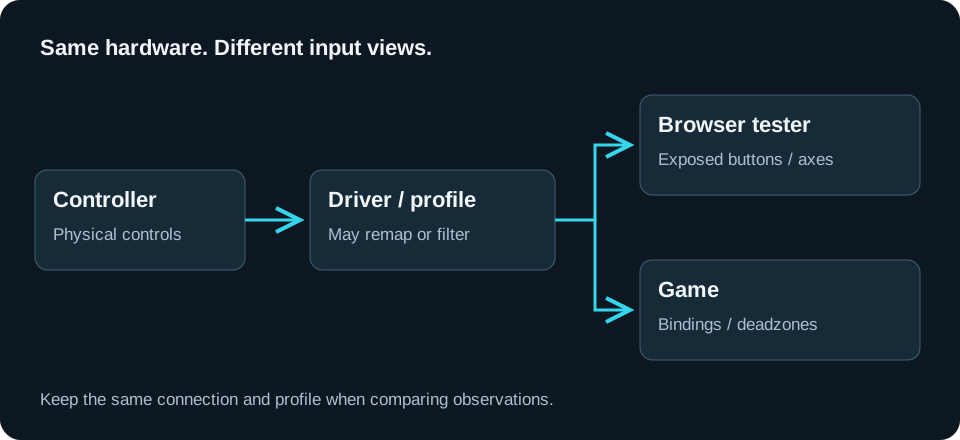
The browser reports the device presented by your input setup. A remapper can translate a physical DualSense into a virtual Xbox-style gamepad. Some third-party PlayStation controllers also use an Xbox-style PC mode. The name describes that output path; it is not a photograph or a reliable inventory of the hardware in your hands.
Check Three Things Separately
- Controller model: choose the physical model for its setup notes and your saved report.
- Connected controller: select the device that responds through the path you intend to inspect.
- Button naming: use PlayStation or Xbox names as a visual aid. This does not change the mapping.
When Everything Works
If the game responds correctly through the intended virtual device, an Xbox name alone is not a fault. Keep that setup as a baseline. Save the profile and connection in the report so future comparisons are meaningful.
When The Actions Are Wrong
Check the game bindings and the active remapping profile. Press one control at a time in the tester and compare it with the game action. If two responding devices appear, use the double-input guide before changing several settings at once.
What This Does Not Establish
Successful buttons and axes do not verify adaptive triggers, speaker output, gyroscope data or a game’s advanced haptics. Sony’s PC guidance distinguishes supported features by device, game and connection.
Open the PS5 controller tester → · Check incorrect actions →